HomeIdentityEngineeringContact
Back to All Projects
FEATURED09 / 10

AttendPro

Cross-platform anti-proxy attendance system — Flutter mobile apps (Android + iOS), web dashboard (HTML/CSS/JS), device fingerprinting, geo-fencing, and automated faculty reports.

FlutterDartHTML/CSS/JS Node.jsMongoDBExpressRender
Live Demo (Web) View Source

Demo Credentials

Admin
admin@college.edu
admin123
Faculty
f1@clg
123456
Student
stu1@clg
123456
Solo Project Android + iOS + Web
500+
Concurrent Users
3
Platforms (Android/iOS/Web)
Anti
Proxy Detection
Auto
Faculty Reports

The Challenge

Traditional attendance systems are plagued by proxy attendance — students mark attendance for absent friends. Faculty spend hours compiling manual reports that are unreliable. Existing digital solutions are either web-only or lack anti-fraud mechanisms.

  • Proxy attendance — one student marks for multiple absent classmates
  • No mobile native app — web-only solutions have poor UX on phones
  • No device verification — no way to confirm attendance is from the student's own device
  • No location validation — students can mark attendance from home
  • Manual report compilation — faculty manually count and calculate percentages

Engineering Thinking

Built a three-platform system: Flutter for Android + iOS mobile apps with native device access, and a web dashboard using HTML/CSS/JS for faculty administration. This ensures students use native apps (better fingerprinting, GPS access) while faculty manage everything from a browser.

Anti-proxy works via triple verification: device fingerprinting (hardware ID unique per phone), geo-fencing (student must be within campus radius), and time-window validation (attendance only open during scheduled class hours). All three must pass simultaneously.

Faculty reports are fully automated — attendance percentages, defaulter lists, subject-wise breakdown, and CSV exports generated without any manual calculation.

CHOSEN

Flutter (Android + iOS) + Web Dashboard

Single Dart codebase for both mobile platforms. Native device access for fingerprinting and GPS. Web dashboard for faculty.

REJECTED

Web-only PWA approach

PWAs can't access hardware device IDs reliably. Native apps provide stronger device fingerprinting for anti-proxy.

REJECTED

Separate Android (Kotlin) + iOS (Swift)

Double the development effort for the same result. Flutter's cross-platform approach was faster for a solo developer.

Why These Technologies

Flutter + Dart
Single codebase for Android + iOS. Native device access for hardware fingerprinting, GPS, and camera.
HTML/CSS/JS
Lightweight faculty web dashboard. No framework overhead — fast load times for report viewing and management.
Node.js + Express
REST API backend handling 500+ concurrent student connections. Non-blocking I/O for high-concurrency attendance marking.
MongoDB
Flexible schema for attendance records. Easy aggregation for attendance percentage calculations and defaulter queries.
Device Fingerprinting
Hardware-level device identification ensures one student = one device. Prevents multi-account proxy attempts.

Key Systems

Anti-Proxy Triple Check

  • Device fingerprint — hardware ID unique per phone
  • Geo-fence — GPS must be within campus boundary
  • Time-window — attendance only during scheduled hours
  • Duplicate detection — same device can't mark twice per session

Automated Faculty Reports

  • Auto-computed attendance percentages per student
  • Defaulter list generation (below threshold %)
  • Subject-wise attendance breakdown
  • CSV export per class/section/subject

Flutter Mobile App

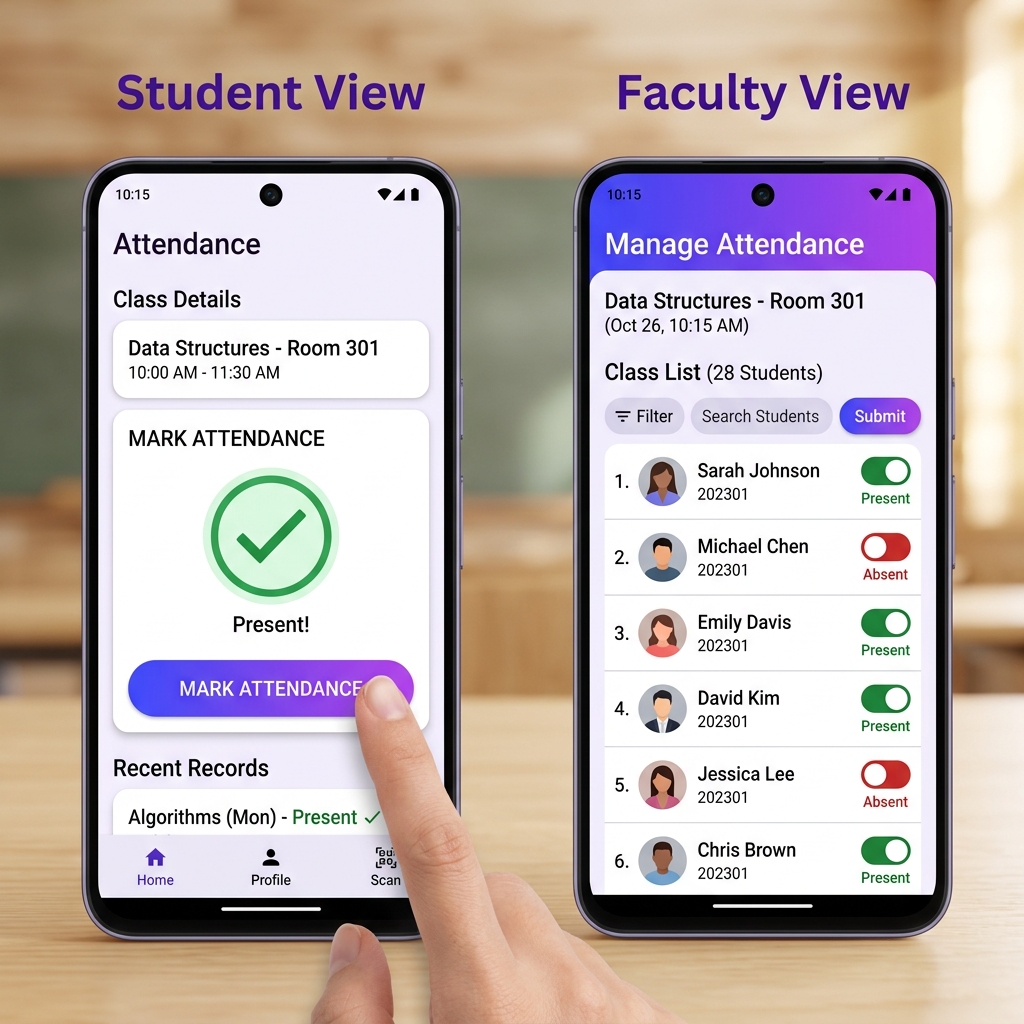
  • Student view: one-tap attendance marking
  • Faculty view: class roster with present/absent toggles
  • Material Design 3 UI with platform-adaptive widgets
  • Offline-first: queues attendance if network drops

High-Concurrency API

  • 500+ simultaneous student connections at peak
  • MongoDB aggregation pipeline for real-time analytics
  • Session-based duplicate prevention
  • Rate limiting to prevent automated abuse

What Broke & What I Learned

Challenge 01
GPS Accuracy Inside Buildings
Geo-fencing worked well outdoors, but indoor GPS accuracy dropped to 20–50 meters. Students in adjacent buildings were incorrectly marked as "within range." Had to widen the geo-fence radius and add WiFi-based location hints as a secondary signal.
Lesson: GPS alone isn't reliable indoors. Multi-signal location (GPS + WiFi + cell tower) improves accuracy significantly.
Challenge 02
Flutter Build for Both Platforms Solo
Building for both Android and iOS as a solo developer meant dealing with two different build toolchains — Gradle for Android, Xcode for iOS. iOS signing certificates and provisioning profiles were especially painful to configure without a Mac initially.
Lesson: Flutter's "write once" promise is real for code, but build/deploy is still platform-specific. Budget time for platform toolchain setup.
Challenge 03
500+ Concurrent Connections at Peak
When an entire batch of 500+ students tries to mark attendance in the first 60 seconds of a class, the API gets hammered simultaneously. Had to implement request queuing, database connection pooling, and staggered retry logic to prevent timeouts.
Lesson: Spike traffic is harder than sustained traffic. Design for burst patterns, not just average load.

What It Achieved

Outcome
3-Platform Coverage
Android + iOS + Web — students use native mobile apps, faculty manage via web dashboard. Single backend serves all three.
Outcome
Anti-Proxy Triple Verification
Device fingerprint + geo-fence + time-window. Three independent checks must pass simultaneously to mark attendance.
Outcome
Zero Manual Reports
Faculty never calculate attendance manually. Percentages, defaulter lists, and CSV exports are fully automated.

Screenshots & Demo

AttendPro Flutter mobile app — student and faculty views
Flutter Mobile App — Student & Faculty Views
*Note: These images are generated by AI, the images will be replaced new very soon
Web Dashboard — Screenshot Coming Soon
Try Live Demo (Web)
Previous
Inventory Management
Next
Volunteer Connect